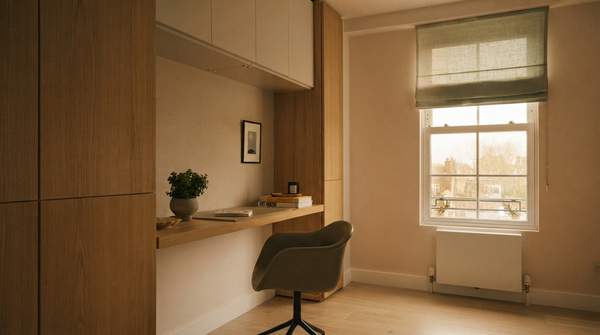
Building a home office that feels calm and keeps your body pain-free comes down to five categories of equipment: a desk, a chair, a pointing device, lighting, and storage. The trick is that most advice serves only one master. Ergonomics guides tell you what protects your wrists and spine; minimalist guides tell you what keeps your desk serene. What they rarely do is meet in the middle. This article gives you a single decision framework that cross-references both goals for each category, so every purchase you make serves your health and your peace of mind at once.
The Dual Imperative: Ergonomics Meets Minimalism
I used to think of these as two separate projects—one about avoiding aches, the other about avoiding clutter. The evidence suggests they're actually the same project. Contour Design, an ergonomic equipment specialist, frames your body as "your most important work tool" and argues that the right equipment prevents the chronic injuries that derail careers. Meanwhile, Eureka Ergonomic's minimalist desk guide insists that "a minimalist desk that causes back pain is not a sanctuary—it's a beautiful failure." That line stuck with me, because it names the exact failure mode: a workspace can look perfect in a photo and still hurt you eight hours a day.
So the dual imperative is real. A setup that is ergonomic but cluttered taxes your attention; a setup that is minimalist but unsupportive taxes your spine. The five categories below are where those two demands converge, and each one has a feature you can check before you buy.
Why Ergonomics Matters: Preventing Pain and Boosting Focus
Let's start with the stakes. Contour Design reports that ergonomic equipment for home office setups can reduce musculoskeletal disorders, and claims that ergonomic mice alone can cut repetitive strain injury risk by up to 60%. Their guidance covers pain "from your fingertips to your feet," which tells you how far-reaching a bad setup can be: wrists, back, neck, even legs.
Their list of essentials is a useful checklist in itself: an ergonomic mouse, an adjustable monitor arm, an ergonomic keyboard, a sit-stand desk, a supportive office chair, a laptop stand, a footrest, and wrist rests. You don't need all eight on day one—but the categories they represent, especially seating and pointing devices, are where poor choices do the most damage. Poor seating contributes to musculoskeletal disorders like lower back pain, and traditional mice can lead to wrist strain and repetitive stress injuries. The payoff runs both directions: Contour Design reports that ergonomic equipment reduces sick days and increases productivity. This isn't comfort for its own sake; it's protecting your ability to work for decades.
The Power of Less: Minimalism for Mental Clarity and Productivity
Now the other half. Eureka Ergonomic's guide is built on a simple behavioral insight: "If you have to dig for a pen, that pen will never find its way back to its drawer." Their advice is to designate a "home" for every essential item before you purge—and if it doesn't have a home, it doesn't stay on the desk.
They also offer a three-tier zoning system I find genuinely useful. The Primary Task Zone is the area within reach of your elbows, reserved for your keyboard, mouse, and current task only. The Secondary Zone is reachable by extending your arms, for frequent tools like a pen cup or notepad. The Tertiary "Away" Zone holds anything used less than once a week—stored in integrated drawers or separate cabinets. The principle behind all of it: a curated environment with designated zones protects mental energy and reduces the small chaos that accumulates on a work surface. An uncluttered desk isn't an aesthetic flex; it's cognitive infrastructure.
Your Minimalist Ergonomic Home Office Decision Framework
Here is the framework. For each of the five essential categories, I've cross-referenced the primary ergonomic objective against the primary minimalist objective to isolate the single feature that satisfies both. Use it as a checklist when you evaluate any product: if a candidate fails the Key Selection Feature column, keep looking.
| Equipment Category | Primary Ergonomic Goal | Primary Minimalist Goal | Key Selection Feature |
|---|---|---|---|
| Desk / Work Surface | Supports proper posture and allows posture variation to reduce musculoskeletal strain | Maximizes usable space and reduces visual clutter for mental clarity | Adjustable height (sit-stand) with integrated, hidden storage |
| Chair / Seating | Provides lumbar support and spinal alignment to prevent back pain | Compact footprint and unobtrusive design that keeps the room calm | Highly adjustable ergonomic chair with a streamlined profile |
| Pointing Device | Reduces wrist strain and promotes a neutral hand and arm posture | Occupies minimal desk space within the Primary Task Zone | An ergonomic mouse design (such as vertical or centered) that keeps your hand neutral |
| Lighting | Supports visual comfort and reduces eye strain | Focused illumination rather than bulky, sprawling fixtures | Adjustable task lighting that directs light only where you work |
| Storage / Organization | Keeps frequently used tools within the correct reach zone | Gives every item a "home" so the desktop stays clear | Integrated drawers or cabinets that hide weekly-use items out of sight |
Notice the pattern: adjustability is the ergonomic lever, and integration is the minimalist lever. A sit-stand desk earns its footprint by replacing two setups with one; storage drawers earn theirs by removing everything that would otherwise sit on the surface. One honest caveat on the lighting row: the ergonomic evidence supports comfort and productivity broadly, and task lighting is a logical extension for a complete setup rather than a directly measured claim.
Beyond the Basics: Integrating Smart Storage and Lighting
Storage and lighting are where the framework pays off most, because they're the categories people skip. Eureka Ergonomic's guide treats storage as foundational, not optional: items used less than once a week belong in integrated drawers or separate cabinets, and the desk itself should hide "the necessities within its frame." Their point about soft-close sliders—that retrieving a tool can be "a quiet, mindful experience"—captures how storage quality shapes the feel of the room, not just its tidiness.
Two boundaries worth stating plainly. First, this framework covers categories, not specific models—your body, budget, and room will determine which product in each category fits. Second, it doesn't address sustainability or material composition, and it assumes a general home office rather than specialized professional needs. Power accessories like surge protectors are outside its scope too.
Building Your Ideal Workspace: A Practical Next Step
Here's the decision I'd encourage you to make: prioritize equipment that offers multi-functionality or integrated features, because those are the items that meet both goals at once—an adjustable desk with built-in drawers, a chair that adjusts without bulk, storage that disappears into the furniture. You don't need to buy everything simultaneously. Start with the chair and pointing device, where the health evidence is strongest, then work outward.
The measurable indicator of success is simple to check: a home office setup where each essential item serves a clear ergonomic purpose and contributes to a visually uncluttered, mentally calm workspace. Walk through your three zones a week after setup—if every item has a home, your elbows have clear reach, and nothing on the surface is used less than weekly, you've built it right.
Sources
- Ergonomic Equipment for Home Office: 8 You'll Use Daily — Contourdesign
- Minimalist Desk Guide: Declutter Your Home Office — Eureka Ergonomic